

页面智能体脚本 · 27 / 37
v1.4.0 新增
智能体脚本(fetch(ctx)、evaluate(ctx)、execute(ctx))
QuantCraft v1.4.0 新增。 本页介绍随下一个主要版本 v1.4.0 发布的功能。当前版本为 v1.3.0,尚不包含这些功能。
智能体脚本是一个 .py 文件,用于给 Agents 画布上的节点添加 Python。它不是 QuantCraft 算法:没有 on_bar / on_tick 回调,也没有 from quantcraft.process.runtime import account。所有内容都通过唯一的参数 ctx 传入。使用 New File → Type: Agent Script 创建(输入不带扩展名的名称;会自动添加 .py;fileKind: "agent_script")。没有类型的旧文件只要定义了 def evaluate(,仍会被识别。
入口函数保留在入口文件中;辅助函数可以从工作区中同级文件导入(从工作区根目录开始的绝对导入,没有 __init__.py,不支持相对导入)。模块每次运行只执行一次并被缓存,因此模块级变量会在各根 K 线之间保留。
各入口函数的使用位置
| 入口函数 | 节点 | 返回值 | 能否下单 |
|---|---|---|---|
def fetch(ctx) | Data 节点,Script 数据源 | 任何可 JSON 序列化的值 | 否 |
def evaluate(ctx) -> bool | Strategy 节点,Script 项 | 真正的 bool(1、"true"、None 会触发 SCRIPT_BAD_RESULT) | 否 |
def execute(ctx) | Execution 节点,Script 动作 | 可选的状态 dict | 是 |
一个文件可以同时定义这三个函数。Strategy 的 Script 项没有嵌套规则:布尔值就是该项的结果。Data 的 Script(或 URL)数据源需要一个 JSON response schema 来描述 fetch 返回的内容;Strategy 节点的 Custom data 项无需 Python 即可比较这些字段。
智能体图规则:Schedule trigger → Data → Strategy / AI Prompt → Execution → Notification。一个节点最多有 2 个父节点,不允许有环;Execution 节点只能连接到 Strategy 或 AI Prompt 节点,其子节点只能是 Notification 节点。入场条件用 true 把关,对应的出场条件用 false 把关。
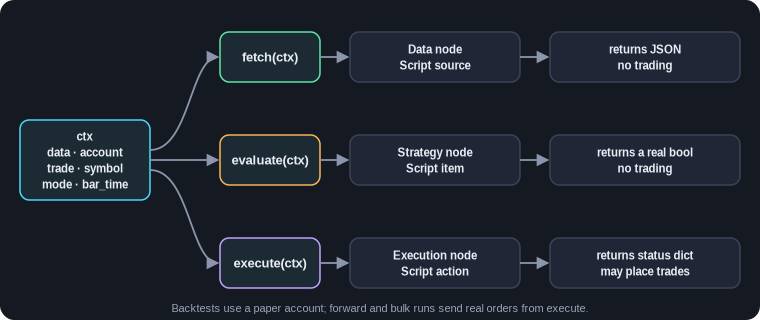
ctx
ctx = {
    "data":     {...},       # see below
    "account":  ...,         # read-only facade
    "trade":    ...,         # reads anywhere; writes only in execute()
    "symbol":   "AAPL",
    "mode":     "backtest",  # or "forward"
    "bar_time": ...,         # snake_case here; ctx["data"]["barTime"] is camelCase
    "timezone": "America/New_York",
    "bars":     [...],       # evaluate() and execute() only (NOT in fetch())
    "run": {...}, "cache": {...},   # advanced
    # execute() additionally gets "action"
}
ctx["data"]
{
  "symbol": "AAPL", "mode": "backtest", "barTime": "2024-01-15T15:00:00Z", "timezone": "America/New_York",
  "ohlcv": {"symbol": "AAPL", "bars": [{"t", "open", "high", "low", "close", "volume"}, ...]},  # oldest first; None if no OHLCV upstream
  "fundamentals": {...} | None,     # point-in-time as-of snapshot
  "fama_french": {...} | None,
  "scripts": [{"kind": "script" | "url", "path": "feed.py", "payload": {...}}],   # upstream Data-node payloads
}ctx["account"](只读)
float 属性(不是方法):balance、cash、starting_balance、equity、unrealized_pnl、realized_pnl;另有 snapshot() -> dict。
ctx["trade"]
- 读取(任何位置均可;
symbol默认为本次运行的标的):open_count(symbol=None) -> int、open_quantity(symbol=None) -> float、positions(symbol=None) -> list[dict](id、symbol、side、qty、entry_price等)、mark_price(symbol=None) -> float。 - 写入 —— 仅限
execute,在其他位置会抛出SCRIPT_TRADE_READONLY:enter(side="buy", *, qty=None, notional=None, symbol=None)、exit(*, qty=None, percentage=None, symbol=None)、flatten(symbol=None)、close_lot(position_id, *, price=None, symbol=None)。 buy对应做多,sell对应做空。close_lot接收来自positions()的 UUID 持仓批次 ID,而不是股票代码。enter/exit按标记价格成交,且enter始终是市价单:脚本无法设置限价/止损/括号订单(Execution 节点的 Entry 动作可以:Market、Limit、Stop、Stop limit、Trailing stop;TIF 为 Day/GTC/OPG/CLS/IOC/FOK;类别为 Simple/Bracket/OCO/OTO)。- 回测使用模拟账户;forward 和批量运行会向所选 Trade 账户发送真实订单。
示例
def evaluate(ctx):                      # price above its 20-bar average
    bars = ((ctx.get("data") or {}).get("ohlcv") or {}).get("bars") or ctx.get("bars") or []
    if len(bars) < 20:
        return False
    closes = [float(b["close"]) for b in bars]
    return closes[-1] > sum(closes[-20:]) / 20.0
def evaluate(ctx): # entry gate: flat, funded, book not crowded
trade, acct = ctx["trade"], ctx["account"]
return trade.open_count(ctx["symbol"]) == 0 and acct.cash > 5_000 and trade.open_count() < 3def evaluate(ctx): # kill switch: within 10% of the starting balance
acct = ctx["account"]
return acct.starting_balance > 0 and 1.0 - acct.equity / acct.starting_balance < 0.10def fetch(ctx): # Data node, Script source
bars = ((ctx.get("data") or {}).get("ohlcv") or {}).get("bars") or []
if len(bars) < 10:
return {"signal": False, "score": 0.0}
closes = [float(b["close"]) for b in bars]
m = closes[-1] / closes[-10] - 1.0
return {"signal": m > 0.02, "score": round(m, 4)}
def evaluate(ctx): # Strategy node: consume the upstream payload
for src in (ctx.get("data") or {}).get("scripts") or []:
p = src.get("payload")
if isinstance(p, dict) and p.get("signal") is True:
return True
return Falsedef evaluate(ctx): # fundamentals gate (snapshot may be None)
fund = (ctx.get("data") or {}).get("fundamentals")
if not fund:
return False
roe = ((fund.get("ratios") or {}).get("quarterly") or {}).get("returnOnEquity")
return roe is not None and roe > 0.12def execute(ctx): # Execution node, Script action
acct, trade = ctx["account"], ctx["trade"]
if acct.equity < 5_000:
return {"ok": False, "reason": "low_equity"}
if trade.open_quantity() == 0:
return trade.enter(side="buy", qty=10)
gain = trade.mark_price() / trade.positions()[0]["entry_price"] - 1.0
if gain > 0.05:
return trade.exit(percentage=50)
if gain < -0.03:
return trade.flatten()
return {"ok": True, "action": "hold"}按一天中的时间设置的条件不应假定时区数据库一定存在(在没有 tzdata 的 Windows 上,zoneinfo.ZoneInfo(...) 会抛出异常):请用 try/except 包裹,并回退到固定偏移量。
常见陷阱
evaluate必须返回真正的bool。- 不要在
evaluate或fetch中调用trade.enter/exit/flatten/close_lot。 fetch中没有ctx["bars"];请读取ctx["data"]["ohlcv"]["bars"]。- 注意
ctx["bar_time"](snake_case)与ctx["data"]["barTime"](camelCase)的区别。 - 脚本无法选择订单类型:限价/止损/括号订单请使用 Execution 节点的 Entry 动作。
- 在账户收到收盘价为正的 tick 之前,
trade.mark_price()会抛出异常。 ctx["data"]中的基本面数据是按时点截取的快照(一个 dict),而不是 Screener 中按升序排列的行列表。
示例:两个错误及其修正
# Mistake 1: returns an int (0) when there is no data -> SCRIPT_BAD_RESULT
def evaluate(ctx):
    closes = [float(b["close"]) for b in ctx["bars"]]
    return len(closes) and closes[-1] > closes[-20]

# Fix: always return a real bool, and guard the history length
def evaluate(ctx):
    closes = [float(b["close"]) for b in ctx["bars"]]
    return len(closes) >= 20 and closes[-1] > closes[-20]

# Mistake 2: placing a trade outside execute() -> SCRIPT_TRADE_READONLY
def evaluate(ctx):
    ctx["trade"].enter("buy", qty=1)
    return True

# Fix: decide in evaluate(), trade in execute()
def evaluate(ctx):
    return ctx["trade"].open_count() == 0

def execute(ctx):
    ctx["trade"].enter("buy", qty=1)
测试与调试
智能体页眉中的 Test 会打开回测对话框(其 Scheduler 标签页会覆盖 Schedule trigger;预取数据需要一个处于活动状态的 Trade 账户)。每个节点的 Output 标签页会流式显示日志和 print() 输出;Strategy / AI Prompt 节点在 Received data 中显示其确切输入。数值设置可以在 Trigger/Strategy/Execution 节点上公开为参数,供 Optimization 标签页使用。