

ページエージェントスクリプト · 27 / 37
v1.4.0 で新登場
エージェントスクリプト(fetch(ctx)、evaluate(ctx)、execute(ctx))
QuantCraft v1.4.0 の新機能です。 このページは、次のメジャーリリースである v1.4.0 で提供される機能を説明しています。現在のリリースは v1.3.0 で、まだ含まれていません。
エージェントスクリプトは、Agents キャンバス上のノードに Python を追加する .py ファイルです。QuantCraft のアルゴではなく、on_bar / on_tick コールバックも from quantcraft.process.runtime import account もありません。すべては 1 つの引数 ctx を通して渡されます。New File → Type: Agent Script で作成します(拡張子なしの名前を入力すると .py が付き、fileKind: "agent_script" になります)。種類のない旧形式のファイルも、def evaluate( を定義していれば検出されます。
エントリーポイントはエントリーファイルに置いたままにします。ヘルパーは、ワークスペース内の同階層のファイルからインポートできます(ワークスペースのルートからの絶対インポートのみで、__init__.py と相対インポートは使えません)。モジュールは実行ごとに 1 回だけ実行されてキャッシュされるため、モジュールレベルの変数はバーをまたいで保持されます。
各エントリーポイントの使用場所
| エントリーポイント | ノード | 戻り値 | 取引を出せるか |
|---|---|---|---|
def fetch(ctx) | Data ノード、Script ソース | JSON にシリアライズ可能な任意の値 | いいえ |
def evaluate(ctx) -> bool | Strategy ノード、Script アイテム | 本物の bool(1、"true"、None は SCRIPT_BAD_RESULT を発生) | いいえ |
def execute(ctx) | Execution ノード、Script アクション | 任意のステータス dict | はい |
1 つのファイルで 3 つすべてを定義できます。Strategy の Script アイテムには入れ子のルールがなく、真偽値がそのアイテムの結果になります。Data の Script(または URL)ソースには、fetch が返す内容を記述する JSON response schema が必要で、Strategy ノードの Custom data アイテムは Python なしでそれらのフィールドを比較できます。
エージェントグラフのルール:Schedule trigger → Data → Strategy / AI Prompt → Execution → Notification。1 つのノードの親は最大 2 つで、循環は不可です。Execution ノードは Strategy または AI Prompt ノードにのみ接続でき、その子は Notification ノードのみです。エントリーは true、対応するエグジットは false でゲートしてください。
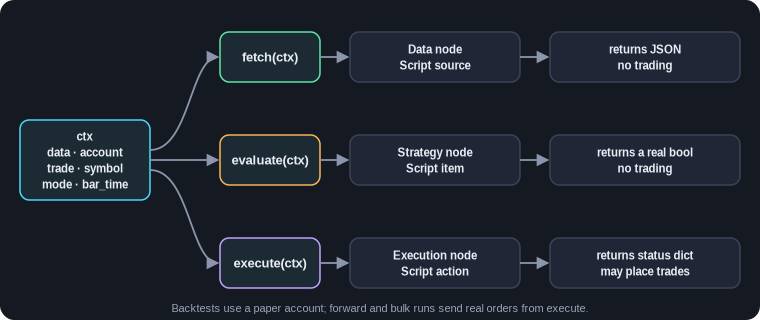
ctx
ctx = {
    "data":     {...},       # see below
    "account":  ...,         # read-only facade
    "trade":    ...,         # reads anywhere; writes only in execute()
    "symbol":   "AAPL",
    "mode":     "backtest",  # or "forward"
    "bar_time": ...,         # snake_case here; ctx["data"]["barTime"] is camelCase
    "timezone": "America/New_York",
    "bars":     [...],       # evaluate() and execute() only (NOT in fetch())
    "run": {...}, "cache": {...},   # advanced
    # execute() additionally gets "action"
}
ctx["data"]
{
  "symbol": "AAPL", "mode": "backtest", "barTime": "2024-01-15T15:00:00Z", "timezone": "America/New_York",
  "ohlcv": {"symbol": "AAPL", "bars": [{"t", "open", "high", "low", "close", "volume"}, ...]},  # oldest first; None if no OHLCV upstream
  "fundamentals": {...} | None,     # point-in-time as-of snapshot
  "fama_french": {...} | None,
  "scripts": [{"kind": "script" | "url", "path": "feed.py", "payload": {...}}],   # upstream Data-node payloads
}ctx["account"](読み取り専用)
float のプロパティ(メソッドではありません):balance、cash、starting_balance、equity、unrealized_pnl、realized_pnl。加えて snapshot() -> dict。
ctx["trade"]
- 読み取り(どこでも可。
symbolの既定は実行中の銘柄):open_count(symbol=None) -> int、open_quantity(symbol=None) -> float、positions(symbol=None) -> list[dict](id、symbol、side、qty、entry_priceなど)、mark_price(symbol=None) -> float。 - 書き込み —
executeの中のみ。それ以外ではSCRIPT_TRADE_READONLYが発生します:enter(side="buy", *, qty=None, notional=None, symbol=None)、exit(*, qty=None, percentage=None, symbol=None)、flatten(symbol=None)、close_lot(position_id, *, price=None, symbol=None)。 buyはロング、sellはショートに対応します。close_lotはpositions()で得た UUID のロット ID を受け取り、ティッカーは受け取りません。enter/exitはマーク価格で約定し、enterは常に成行注文です。スクリプトでは指値/逆指値/ブラケット注文を設定できません(Execution ノードの Entry アクションでは可能です:Market、Limit、Stop、Stop limit、Trailing stop、TIF は Day/GTC/OPG/CLS/IOC/FOK、クラスは Simple/Bracket/OCO/OTO)。- バックテストはペーパーアカウントを使用し、フォワード実行と一括実行は選択した Trade アカウントに実際の注文を送信します。
例
def evaluate(ctx):                      # price above its 20-bar average
    bars = ((ctx.get("data") or {}).get("ohlcv") or {}).get("bars") or ctx.get("bars") or []
    if len(bars) < 20:
        return False
    closes = [float(b["close"]) for b in bars]
    return closes[-1] > sum(closes[-20:]) / 20.0
def evaluate(ctx): # entry gate: flat, funded, book not crowded
trade, acct = ctx["trade"], ctx["account"]
return trade.open_count(ctx["symbol"]) == 0 and acct.cash > 5_000 and trade.open_count() < 3def evaluate(ctx): # kill switch: within 10% of the starting balance
acct = ctx["account"]
return acct.starting_balance > 0 and 1.0 - acct.equity / acct.starting_balance < 0.10def fetch(ctx): # Data node, Script source
bars = ((ctx.get("data") or {}).get("ohlcv") or {}).get("bars") or []
if len(bars) < 10:
return {"signal": False, "score": 0.0}
closes = [float(b["close"]) for b in bars]
m = closes[-1] / closes[-10] - 1.0
return {"signal": m > 0.02, "score": round(m, 4)}
def evaluate(ctx): # Strategy node: consume the upstream payload
for src in (ctx.get("data") or {}).get("scripts") or []:
p = src.get("payload")
if isinstance(p, dict) and p.get("signal") is True:
return True
return Falsedef evaluate(ctx): # fundamentals gate (snapshot may be None)
fund = (ctx.get("data") or {}).get("fundamentals")
if not fund:
return False
roe = ((fund.get("ratios") or {}).get("quarterly") or {}).get("returnOnEquity")
return roe is not None and roe > 0.12def execute(ctx): # Execution node, Script action
acct, trade = ctx["account"], ctx["trade"]
if acct.equity < 5_000:
return {"ok": False, "reason": "low_equity"}
if trade.open_quantity() == 0:
return trade.enter(side="buy", qty=10)
gain = trade.mark_price() / trade.positions()[0]["entry_price"] - 1.0
if gain > 0.05:
return trade.exit(percentage=50)
if gain < -0.03:
return trade.flatten()
return {"ok": True, "action": "hold"}時刻による条件では、tz データベースが存在すると仮定してはいけません(tzdata のない Windows では zoneinfo.ZoneInfo(...) が例外を発生します)。try/except で囲み、固定オフセットにフォールバックしてください。
注意点
evaluateは本物のboolを返さなければなりません。evaluateやfetchからtrade.enter/exit/flatten/close_lotを呼び出さないでください。fetchにはctx["bars"]がありません。ctx["data"]["ohlcv"]["bars"]を読んでください。ctx["bar_time"](snake_case)とctx["data"]["barTime"](camelCase)の違いに注意してください。- スクリプトでは注文タイプを選べません。指値/逆指値/ブラケットには Execution ノードの Entry アクションを使用してください。
- アカウントが正の終値のティックを受け取るまで、
trade.mark_price()は例外を発生します。 ctx["data"]内のファンダメンタルズは時点指定のスナップショット(dict)であり、Screener の昇順の行リストではありません。
例:2 つの間違いとその修正
# Mistake 1: returns an int (0) when there is no data -> SCRIPT_BAD_RESULT
def evaluate(ctx):
    closes = [float(b["close"]) for b in ctx["bars"]]
    return len(closes) and closes[-1] > closes[-20]

# Fix: always return a real bool, and guard the history length
def evaluate(ctx):
    closes = [float(b["close"]) for b in ctx["bars"]]
    return len(closes) >= 20 and closes[-1] > closes[-20]

# Mistake 2: placing a trade outside execute() -> SCRIPT_TRADE_READONLY
def evaluate(ctx):
    ctx["trade"].enter("buy", qty=1)
    return True

# Fix: decide in evaluate(), trade in execute()
def evaluate(ctx):
    return ctx["trade"].open_count() == 0

def execute(ctx):
    ctx["trade"].enter("buy", qty=1)
テストとデバッグ
エージェントヘッダーの Test でバックテストのモーダルが開きます(Scheduler タブが Schedule trigger を上書きし、データの事前取得にはアクティブな Trade アカウントが必要です)。各ノードの Output タブにはログと print() の出力が流れ、Strategy / AI Prompt ノードは Received data で正確な入力を表示します。数値設定は、Trigger/Strategy/Execution ノードでパラメーターとして公開し、Optimization タブで使用できます。