

PagesData extensions · 31 / 37
New in v1.4.0
Data source extensions
New in QuantCraft v1.4.0. This page describes functionality that ships with v1.4.0, the next major release. The current release is v1.3.0, which does not include it yet.
A data extension supplies market data from a vendor of your choice: price bars, live trades, symbol lists, prices beside each symbol, or company fundamentals. Install one (see Extensions), give it the key it asks for, then choose it wherever you want it used. Nothing changes until you choose it.
Set it up first
Open the extension's page → Settings. Data extensions usually have a Set up… wizard (Data source setup):
- Enter your API key. It is stored as a secret on this computer, is never shown again, and is sent only to the websites the extension declared.
- Test fetches a few days of a sample symbol and shows how many bars came back, the latency and the requests left this minute.
- Finish — "name is ready. Pick it as the data source in a chart or a backtest."
If the test fails, the message the vendor returned is shown so you can fix the key or the limits.
Choose where it is used
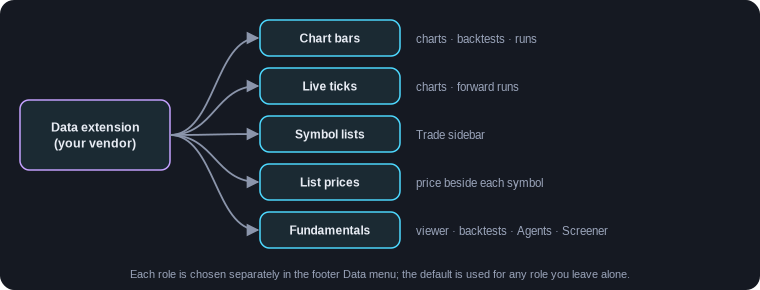
For everything: the footer Data menu
Click Data in the footer. For each role pick Default or an extension:
| Role | What it feeds |
|---|---|
| Chart bars | Candles on Trade charts, and the history your backtests and runs use |
| Live ticks | The live feed of trades on a chart and in forward runs. With extension bars and no live source chosen, live data follows the bars source |
| Symbol lists | The symbol list in the Trade sidebar (with its asset types) |
| List prices | The price beside each symbol in those lists |
| Fundamentals | The fundamentals viewer on a chart, backtests, Agents and the Screener |
Your choice is saved. The default for bars, ticks, symbols and prices is the built-in market data; the default for fundamentals is QuantCraft.
For one chart: the chart's data source chip
Each chart has a Chart data source chip. Choosing an extension there overrides the footer for that symbol's bars and ticks only.
For a backtest
In the backtest modal, the Price feed field offers your data extensions. If a vendor is slow or rate-limited, press Pre-fetch now: it downloads the data first (with progress, and stops cleanly if a limit is hit) so the run does not wait on the vendor. Tick replay can replay real trades from an extension that provides them.
For forward (live) runs
A run started on an extension keeps using it. Choose what happens If it fails: Stop the run, or Switch to QuantCraft data and keep running. The extension runs inside QuantCraft, so the app must stay open for the run.
When a source fails
You are never left with a blank chart without being told.
- A failing source is skipped for a couple of minutes and the default source serves meanwhile. Your choice is kept, and the footer Data item shows a warning naming the extension and the reason.
- A source that is switched off, uninstalled, or no longer offers that role simply reads as Default until you fix it.
- Picking the source again in the footer is a retry.
- Fundamentals are stricter: an extension's fundamentals never fall back to QuantCraft on their own. A symbol it has no data for shows a notice, and a run that needs those fundamentals stops, so you never get numbers from a different source than the one you chose.
- The Debug panel of your own project (see Building extensions) has a Data sources tab that says, per role, which source is serving and why.
Fundamentals from an extension
- Charts and runs: the fundamentals viewer shows a banner saying which source is showing. Backtests, forward runs and Agent rules read the extension's numbers as they were known at the time: a report counts only after its filing date, so a backtest never sees a result before it was public.
- Agents: in the rule editor, fields the chosen source does not supply are marked.
- Screener: with an extension chosen, the Screener builds its universe from that source's symbol list and its own copy of the data. It is filled by an explicit Sync (this can be slow, and obeys the vendor's rate limits) and kept separate from the QuantCraft fundamentals. Only the fields the extension provides are offered as filters.
Limits and quotas
Extensions declare the vendor's request limits (per minute, per day). QuantCraft paces calls to stay under them, and stops and tells you when a vendor reports a rate or quota error rather than retrying blindly. A Pre-fetch that hits a daily quota stops with a message and keeps what it fetched.
Not available with extension data
- Cloud runs (QuantCloud and cloud bulk runs) cannot use an extension source, because it runs on your computer. QuantCraft offers Switch and run in the cloud with built-in data, or Run locally (which stops if QuantCraft closes or the computer sleeps).
- Pop-out windows use the default sources.