

PagesAgent Scripts · 27 / 37
New in v1.4.0
Agent Scripts (fetch(ctx), evaluate(ctx), execute(ctx))
New in QuantCraft v1.4.0. This page describes functionality that ships with v1.4.0, the next major release. The current release is v1.3.0, which does not include it yet.
An Agent Script is a .py file that adds Python to a node on the Agents canvas. It is not a QuantCraft Algo: there are no on_bar / on_tick callbacks, no from quantcraft.process.runtime import account. Everything arrives through one argument, ctx. Create it with New File → Type: Agent Script (stem name; .py is added; fileKind: "agent_script"). A legacy file with no kind is still detected if it defines def evaluate(.
The entrypoints stay in the entry file; helpers may be imported from sibling workspace files (absolute imports from the workspace root, no __init__.py, no relative imports). The module is executed once per run and cached, so module-level variables persist from bar to bar.
Where each entrypoint is used
| Entrypoint | Node | Returns | May place trades |
|---|---|---|---|
def fetch(ctx) | Data node, Script source | any JSON-serialisable value | no |
def evaluate(ctx) -> bool | Strategy node, Script item | a real bool (1, "true", None raise SCRIPT_BAD_RESULT) | no |
def execute(ctx) | Execution node, Script action | optional status dict | yes |
One file may define all three. A Strategy Script item has no nested rules: the boolean is the item's result. A Data Script (or URL) source needs a JSON response schema describing what fetch returns; a Strategy node's Custom data item can compare those fields without Python.
Agent graph rules: Schedule trigger → Data → Strategy / AI Prompt → Execution → Notification. A node has at most 2 parents, no cycles, an Execution node attaches only to a Strategy or AI Prompt node and its only children are Notification nodes. Gate an entry on true and its matching exit on false.
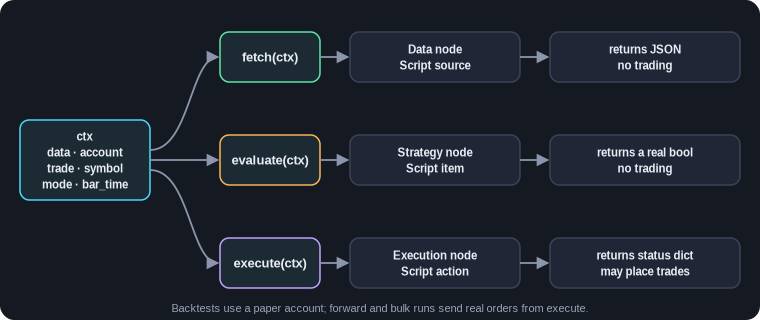
ctx
ctx = {
    "data":     {...},       # see below
    "account":  ...,         # read-only facade
    "trade":    ...,         # reads anywhere; writes only in execute()
    "symbol":   "AAPL",
    "mode":     "backtest",  # or "forward"
    "bar_time": ...,         # snake_case here; ctx["data"]["barTime"] is camelCase
    "timezone": "America/New_York",
    "bars":     [...],       # evaluate() and execute() only (NOT in fetch())
    "run": {...}, "cache": {...},   # advanced
    # execute() additionally gets "action"
}
ctx["data"]
{
  "symbol": "AAPL", "mode": "backtest", "barTime": "2024-01-15T15:00:00Z", "timezone": "America/New_York",
  "ohlcv": {"symbol": "AAPL", "bars": [{"t", "open", "high", "low", "close", "volume"}, ...]},  # oldest first; None if no OHLCV upstream
  "fundamentals": {...} | None,     # point-in-time as-of snapshot
  "fama_french": {...} | None,
  "scripts": [{"kind": "script" | "url", "path": "feed.py", "payload": {...}}],   # upstream Data-node payloads
}
ctx["account"] (read-only)
Float properties (not methods): balance, cash, starting_balance, equity, unrealized_pnl, realized_pnl; plus snapshot() -> dict.
ctx["trade"]
- Reads (anywhere;
symboldefaults to the run symbol):open_count(symbol=None) -> int,open_quantity(symbol=None) -> float,positions(symbol=None) -> list[dict](id,symbol,side,qty,entry_price, …),mark_price(symbol=None) -> float. - Writes — only in
execute, anywhere else raisesSCRIPT_TRADE_READONLY:enter(side="buy", *, qty=None, notional=None, symbol=None),exit(*, qty=None, percentage=None, symbol=None),flatten(symbol=None),close_lot(position_id, *, price=None, symbol=None). buymaps to long,sellto short.close_lottakes the UUID lot id frompositions(), never a ticker.enter/exitfill at the mark andenteris always a market order: scripts cannot set limit/stop/bracket orders (the Execution node's Entry action can: Market, Limit, Stop, Stop limit, Trailing stop; TIF Day/GTC/OPG/CLS/IOC/FOK; class Simple/Bracket/OCO/OTO).- Backtests use a paper account; forward and bulk runs send real orders to the selected Trade account.
Examples
def evaluate(ctx):                      # price above its 20-bar average
    bars = ((ctx.get("data") or {}).get("ohlcv") or {}).get("bars") or ctx.get("bars") or []
    if len(bars) < 20:
        return False
    closes = [float(b["close"]) for b in bars]
    return closes[-1] > sum(closes[-20:]) / 20.0
def evaluate(ctx): # entry gate: flat, funded, book not crowded
trade, acct = ctx["trade"], ctx["account"]
return trade.open_count(ctx["symbol"]) == 0 and acct.cash > 5_000 and trade.open_count() < 3def evaluate(ctx): # kill switch: within 10% of the starting balance
acct = ctx["account"]
return acct.starting_balance > 0 and 1.0 - acct.equity / acct.starting_balance < 0.10def fetch(ctx): # Data node, Script source
bars = ((ctx.get("data") or {}).get("ohlcv") or {}).get("bars") or []
if len(bars) < 10:
return {"signal": False, "score": 0.0}
closes = [float(b["close"]) for b in bars]
m = closes[-1] / closes[-10] - 1.0
return {"signal": m > 0.02, "score": round(m, 4)}
def evaluate(ctx): # Strategy node: consume the upstream payload
for src in (ctx.get("data") or {}).get("scripts") or []:
p = src.get("payload")
if isinstance(p, dict) and p.get("signal") is True:
return True
return Falsedef evaluate(ctx): # fundamentals gate (snapshot may be None)
fund = (ctx.get("data") or {}).get("fundamentals")
if not fund:
return False
roe = ((fund.get("ratios") or {}).get("quarterly") or {}).get("returnOnEquity")
return roe is not None and roe > 0.12def execute(ctx): # Execution node, Script action
acct, trade = ctx["account"], ctx["trade"]
if acct.equity < 5_000:
return {"ok": False, "reason": "low_equity"}
if trade.open_quantity() == 0:
return trade.enter(side="buy", qty=10)
gain = trade.mark_price() / trade.positions()[0]["entry_price"] - 1.0
if gain > 0.05:
return trade.exit(percentage=50)
if gain < -0.03:
return trade.flatten()
return {"ok": True, "action": "hold"}A time-of-day gate must not assume the tz database exists (zoneinfo.ZoneInfo(...) raises on Windows without tzdata): wrap it in try/except and fall back to a fixed offset.
Pitfalls
evaluatemust return a realbool.- Do not call
trade.enter/exit/flatten/close_lotfromevaluateorfetch. ctx["bars"]does not exist infetch; readctx["data"]["ohlcv"]["bars"].ctx["bar_time"](snake_case) vsctx["data"]["barTime"](camelCase).- Scripts cannot choose an order type: use the Execution node's Entry action for limit/stop/bracket.
trade.mark_price()raises until the account has been ticked with a positive close.- Fundamentals inside
ctx["data"]are an as-of snapshot (a dict), not the screener's ascending row lists.
Example: two mistakes and their fixes
# Mistake 1: returns an int (0) when there is no data -> SCRIPT_BAD_RESULT
def evaluate(ctx):
    closes = [float(b["close"]) for b in ctx["bars"]]
    return len(closes) and closes[-1] > closes[-20]

# Fix: always return a real bool, and guard the history length
def evaluate(ctx):
    closes = [float(b["close"]) for b in ctx["bars"]]
    return len(closes) >= 20 and closes[-1] > closes[-20]

# Mistake 2: placing a trade outside execute() -> SCRIPT_TRADE_READONLY
def evaluate(ctx):
    ctx["trade"].enter("buy", qty=1)
    return True

# Fix: decide in evaluate(), trade in execute()
def evaluate(ctx):
    return ctx["trade"].open_count() == 0

def execute(ctx):
    ctx["trade"].enter("buy", qty=1)
Test and debug
Test in the agent header opens the backtest modal (its Scheduler tab overrides the Schedule trigger; an active Trade account is required to prefetch data). Each node's Output tab streams logs and print() output; Strategy / AI Prompt nodes show their exact inputs on Received data. Numeric settings can be exposed as parameters on a Trigger/Strategy/Execution node for the Optimization tab.