#TradeSmarter

analyzeautomaterepeat

Seamlessly analyze charts, automate strategies, backtest, optimize and deploy your strategies.

Trading UIStrategy AutomationBacktest & Optimization
QuantCraft product interface preview
Inside QuantCraft
11,000+ US stocks & ETFs◆✦ AI writes entire algos◆Grid & genetic optimization◆MCP servers for the AI◆QuantMind papers → knowledge◆No-code trading agents◆Free fundamentals◆8 languages◆
11,000+US stocks and ETFs with OHLCV for backtests and trading.
FreeFundamentals for major US stocks, on charts and in algos.
Paper or liveOrders through your own broker integration.
3 platformsWindows and macOS — one desktop app.

11,000+ U.S. stocks and ETFs Fundamentals, and OHLCV data available for backtest, and trading through Broker integration.

AppleTeslaNVIDIABitcoinEthereumSolana
01 — QuantCraft AI

An AI quant on your desk.

Describe the idea. QuantCraft AI writes the strategy, runs the backtest, tunes the parameters and wires it into an agent — inside the same workspace you trade from.

✦Coding assistant01

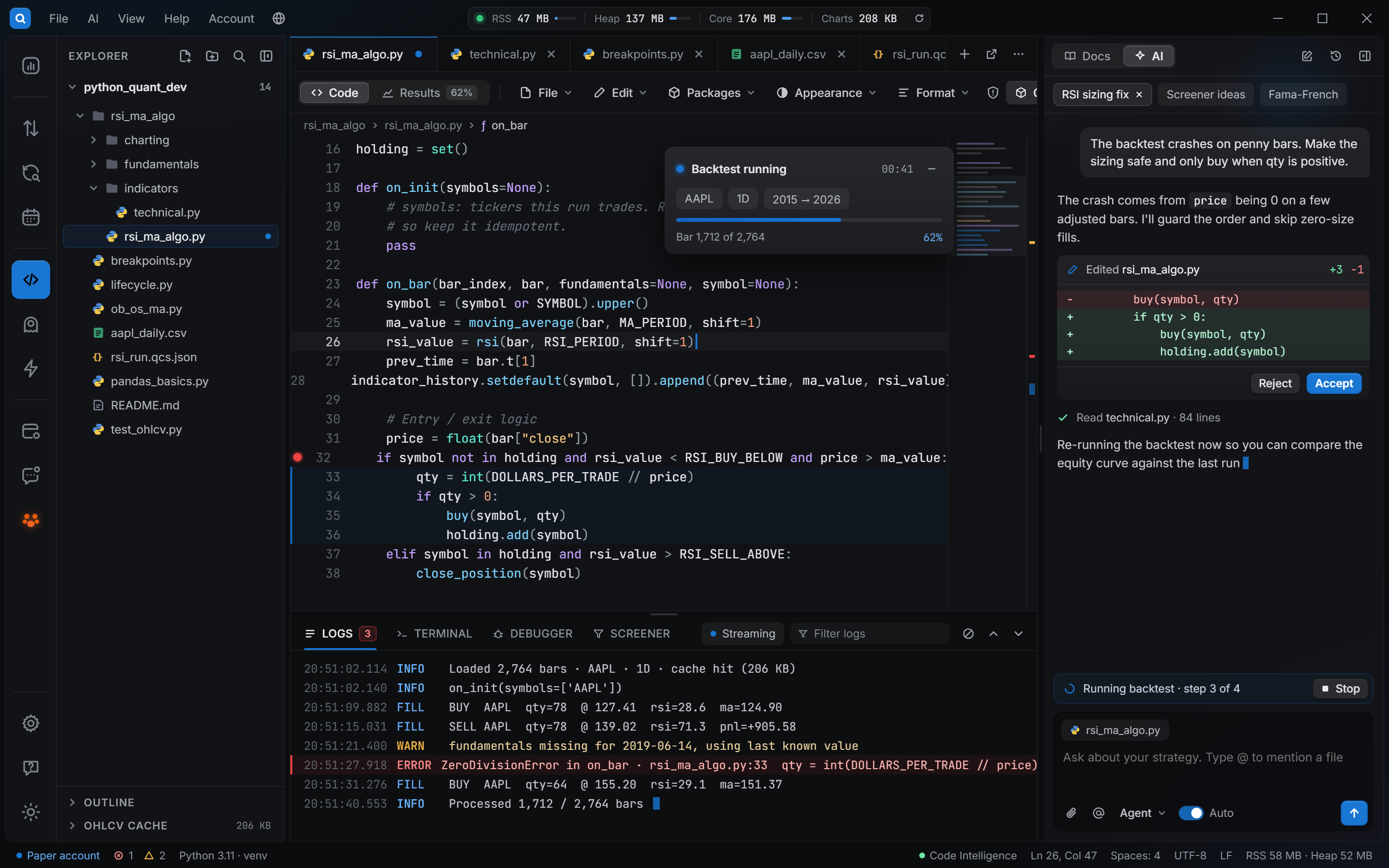
Write entire algos from a sentence

Chat, Plan or Agent mode. The assistant sees your open files and @-mentions, creates and edits whole projects, and every change goes through Accept / Undo with the lines highlighted.

1import pandas as pd
2
3class MaRevert(Strategy):4    period = Input(42)56    def on_bar(self, bar):7        ma = self.sma(self.period)8        if bar.close < ma and not self.position:9            self.buy()10        elif bar.close > ma:11            self.close()   # exit
✦Agent
@ma_revert.py add an MA-45 mean-reversion entry and exit.
Edited ma_revert.py · +9 lines
  • Inputs exposed for optimization
  • Compiles for Trade charts
Ask, or @-mention a file…
✦Backtest & optimize02

Let the AI run the sessions

It picks symbols and date ranges, runs backtests and grid or genetic searches, then reports what held up.

  • 3 symbols · 2019–2026 · 15m
  • Grid: period × stop
  • Genetic: generation 7/12
✦ AI Builder · Agents03

Describe an agent, get the workflow

✦ Buy when price is below MA 45 with no open trade; alert me when trades open or close.
Schedule trigger1 rule
Price data (daily OHLCV)1 source
BUY: price below MA 45& no open trade
Enter buy (market)then Alert: trade opened
MCP04

Plug in MCP servers

Connect Model Context Protocol servers and the AI can use their tools — your research database, filings, notes or in-house risk checks.

research-dbstdio · 6 tools
filings-searchhttp · 3 tools
risk-limitsstdio · 2 tools
+ Add MCP server
QuantMind05

Full QuantMind support

Use QuantMind inside QuantCraft: papers, news and filings become structured, cited knowledge the AI can retrieve while it builds.

PapersNewsFilings
↓ PaperFlow · collect_news
Short-horizon reversal after earnings gapssource: paper · cited · 2024-03-11 · timestamped
Bring your model: Anthropic (Claude) · DeepSeek · OpenCode · QuantCraft Premium · any OpenAI-compatible endpoint (Ollama, vLLM, llama.cpp). Your keys stay on your machine.
02 — Automation

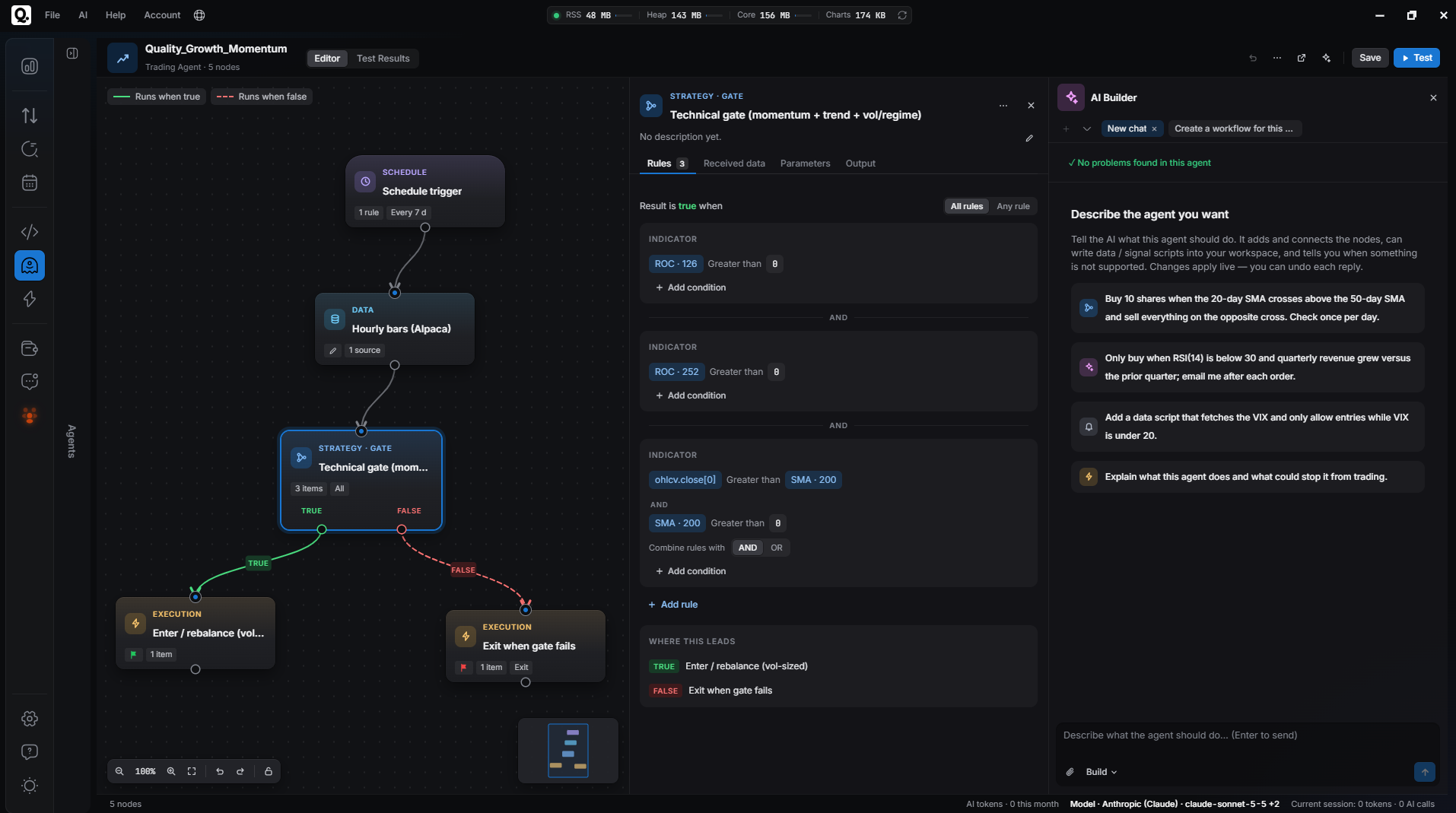
Automate strategies without code.

  • Drag, connect, done. Triggers, price data, rules, orders and alerts on one canvas.
  • Test before it trades. Run an agent on history and read the results first.
  • Paper or live. Agents trade through your broker and log every action in Trade Manager.
  • Or let AI draft it. Describe the agent; the AI Builder lays out the nodes.
Read the Agents guideAutoTrading · Agents · QuantCloud
QuantCraft Agents editor: an AutoBots workflow with a schedule trigger, daily OHLCV, buy and close rules, market orders and trade alerts
03 — Fundamentals & screener

Fundamentals, free. Screened, then traded.

Free fundamentals for major US stocks — statements, ratios and earnings — on your charts, in your algos and behind a no-code screener.

Free · major US stocks

Statements, ratios, earnings

Fields available for Apple Inc. (AAPL), Jul 31, 2026
Balance sheet44 / 64
Income statement24 / 36
Cash flow27 / 31
Financial ratios91 / 91
Financials extended14 / 20
Earnings13 / 17
Explore coverage by ticker
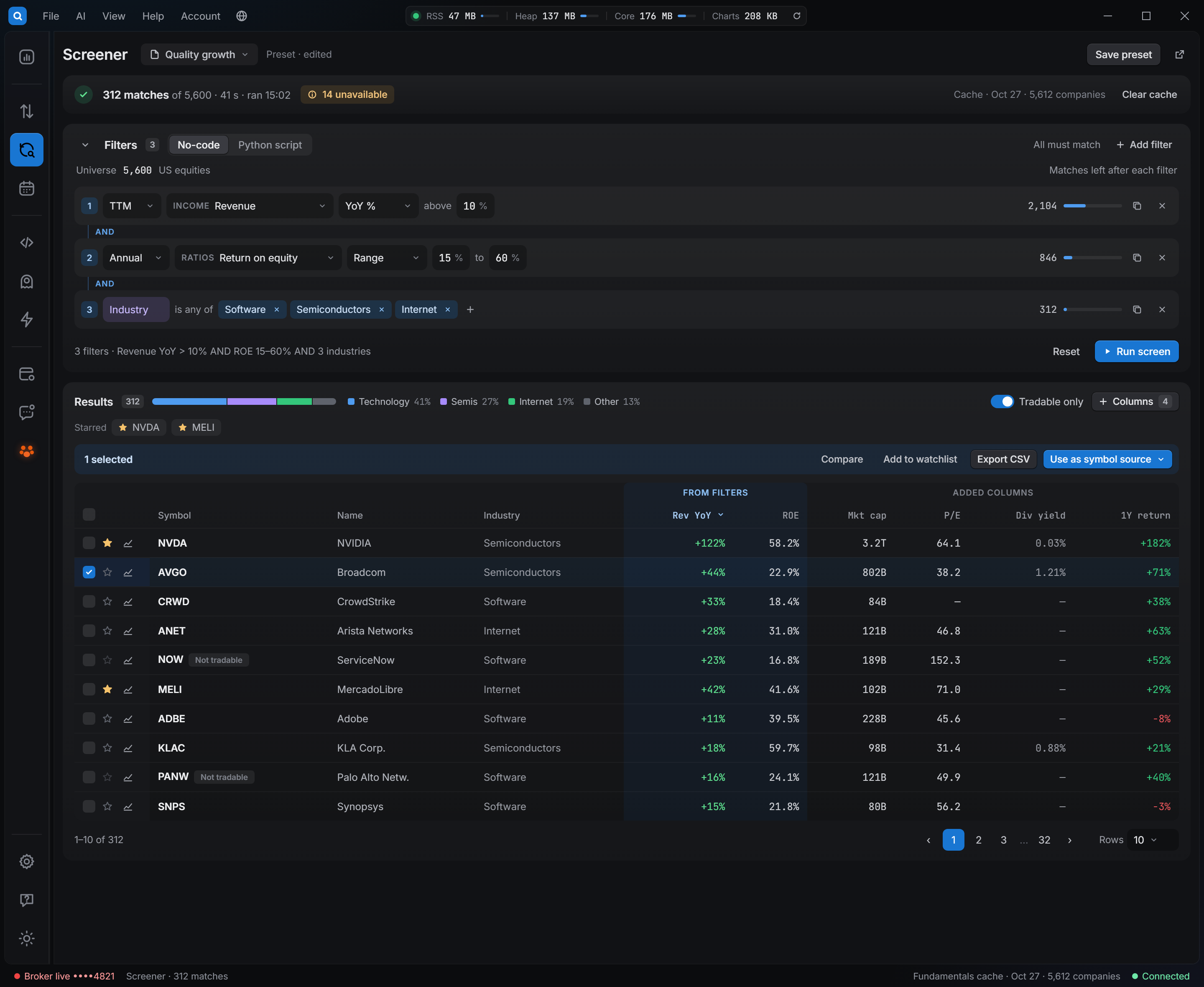
ScreenerNo-code filters or Python

Screen thousands of US stocks in seconds

Period, field, filter, range — add rows, run, sort. Tradable-only toggle, custom columns and saved presets.

QuantCraft Screener: a price-to-earnings filter of 1–30 matching 1,783 of 9,141 symbols, with industry, P/E, P/B, net income and free cash flow columns
Real run: 1,783 of 9,141 symbols matched in 14s · from cache, no downloads
Screener → algo

Plug algos into screeners

A saved screen picks the symbols for a backtest, a bulk forward run or an agent. Only stocks that meet your fundamental rules get traded — and the list refreshes as new filings land.

Quality growth3 rules · 12 symbols
→
ma_revert.pybulk forward run
→
Brokerpaper · live
04 — Workspace

A workspace for analysis, automation, optimization, and deployment.

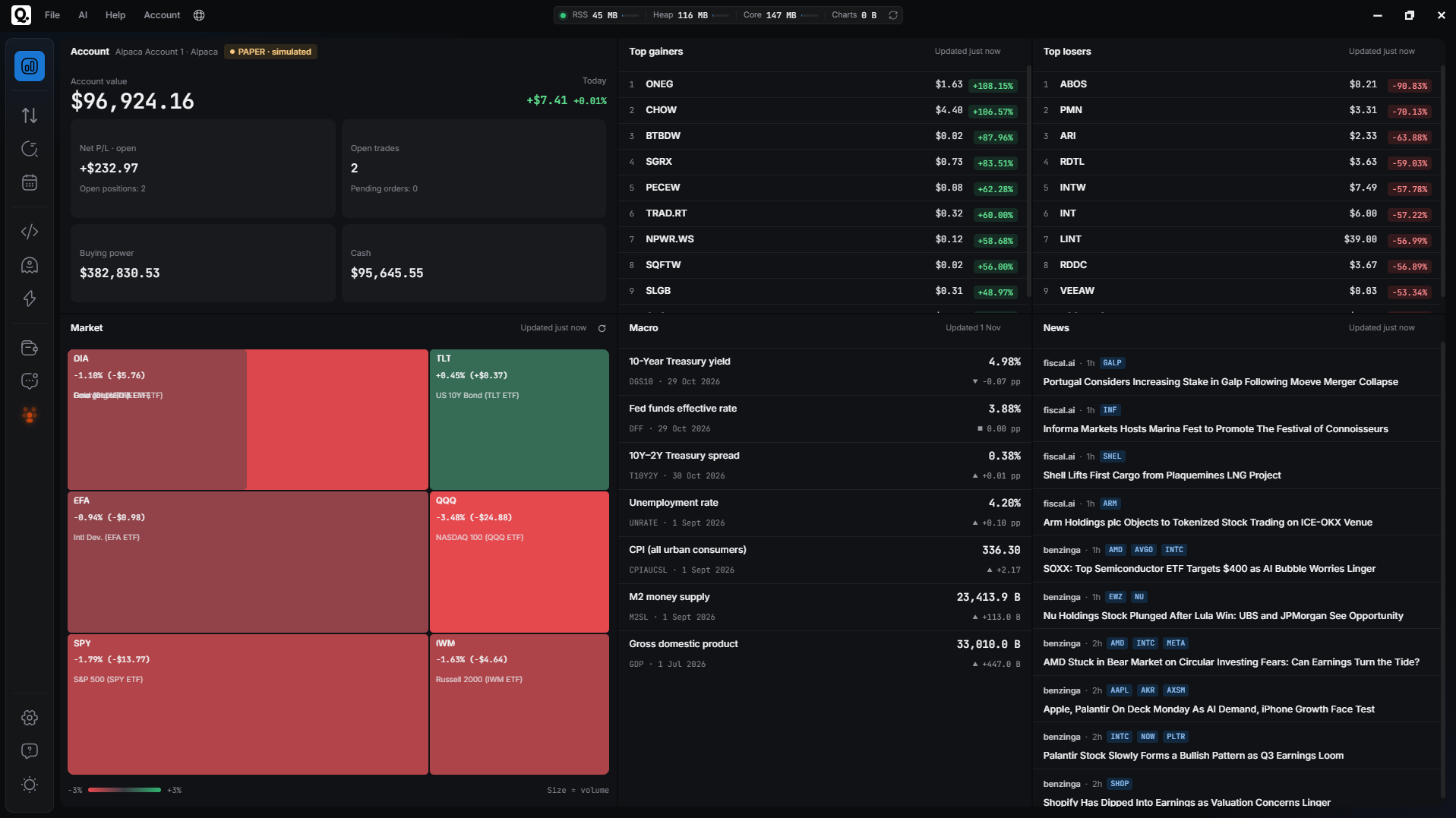
Dashboard

Market summary, top movers, and news

See market context, top movers, headlines, and your account overview when you connect an account.

Dashboard
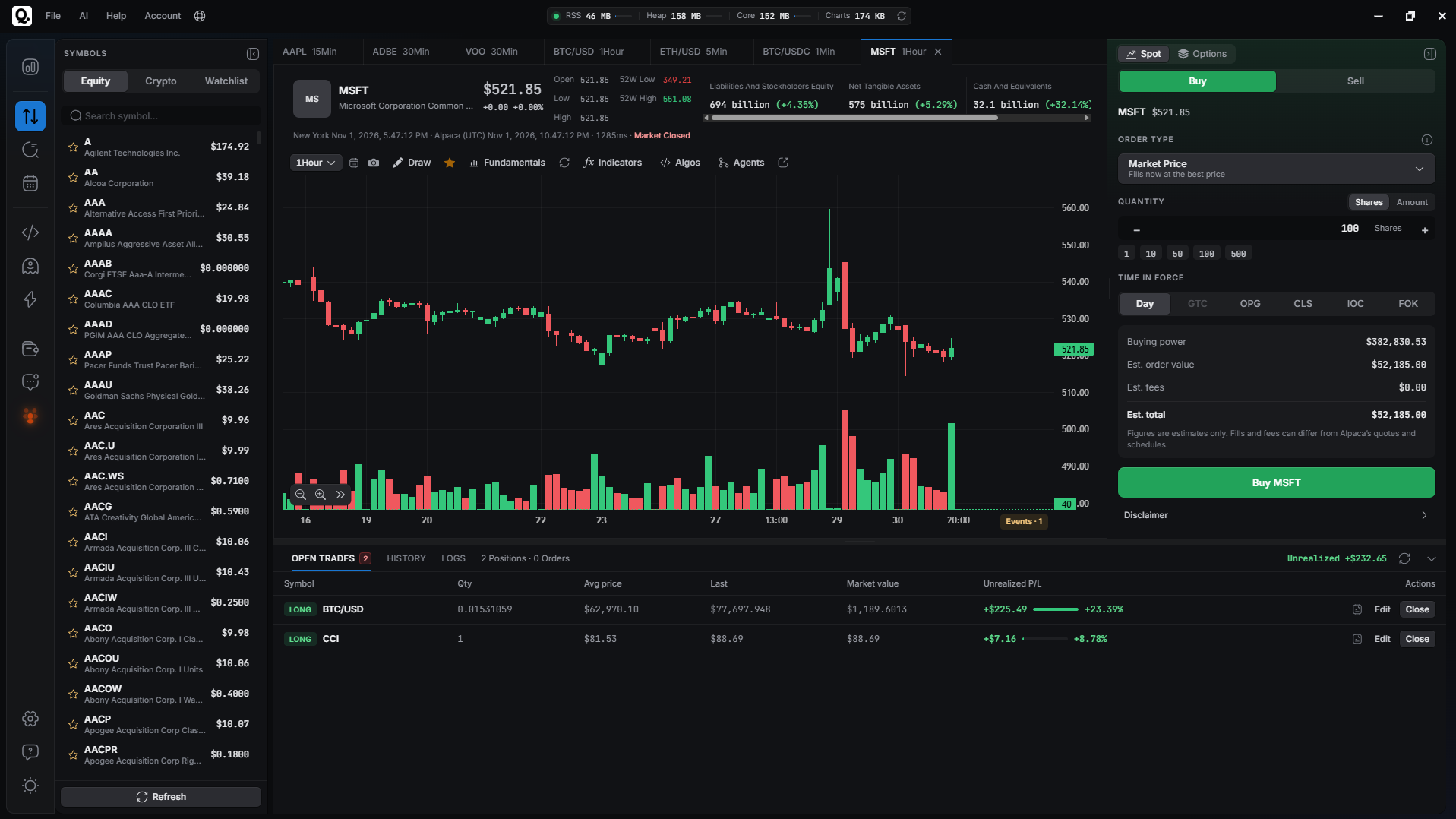
Trade

TradeCharts, watchlist, and Trade management

Equities and crypto charts, watchlists, and orders through Broker integration (paper or live).

QuantCraft IDE

IDEPython IDE, backtest, and parameter optimization

A built-in Python workspace for your strategies: run code, backtest on history, and tune parameters with grid or genetic search.

05 — Languages

Speaks your language.

The app and this website in eight languages, right-to-left included.

English ENFrançais FREspañol ESالعربية ARPortuguês PTDeutsch DE日本語 JA中文 ZH
06 — Pricing

One plan. All features included

Free
$0No credit card required

The full QuantCraft desktop app in one free tier.

Get QuantCraft
07 — FAQ

Questions & Answers

Find your answers here. if you don’t find it here, please contact us.

Contact us
What is QuantCraft?
QuantCraft is a desktop app for Windows and macOS. It combines a market dashboard, Trade (charts, watchlists, and orders), and QuantCraft—a built-in Python IDE for strategies, backtests, and parameter optimization. You work in one workspace on your computer; there is no web app or mobile client for the full experience.
Is QuantCraft free, and will it stay a desktop app?
QuantCraft is free to use (one free plan, full app access). You bring your own broker account when you are ready to connect. The product is desktop only—not a website or phone app—so you install and run it on a desktop or laptop.
What can I do in QuantCraft?
QuantCraft is QuantCraft’s integrated Python environment: you edit .py files in a project tree, add PyPI packages, run code, and open Test to backtest strategies on historical data with the dates, symbols, and timeframes you choose. You can also run parameter optimization (e.g. grid or genetic search) and compile strategies to attach to live charts; results and forward-run logs can appear where the app provides them.
How do I get help or contact support?
The app includes an in-app FAQ and help areas for accounts, Trade, and QuantCraft. You can also use the Contact us path on the website or the support and feedback options referenced in the product (e.g. email and feedback channels) when you need more than the docs in the app.

Try it now!

Free on Windows and macOS. Your first backtest is minutes away.

Get QuantCraft